
For startups & smes
Show up where your future customers ask for help.
People compare products, ask for recommendations and look for solutions on X, Reddit and YouTube. ScaleBuzz helps you find those conversations and contribute useful replies in your own voice.
No card to startNo subscriptionHuman approval before replies
Where opportunities start
Be part of the conversations already happening.
You do not need to interrupt people to get noticed. Start with the questions they are already asking.
RECOMMENDATIONS
When people ask for recommendations
Discover conversations about the problems your product solves, even when nobody mentions your brand.
ALTERNATIVES
When they compare alternatives
Find relevant discussions about tools and approaches. Join in when you have something genuinely useful to add.
CONTENT IDEAS
When questions keep repeating
Spot recurring topics and turn what you learn into helpful content for your own channels.
Three practical steps
From a topic to a meaningful reply.
ScaleBuzz handles finding conversations and preparing a draft. You choose what to say and where to participate.
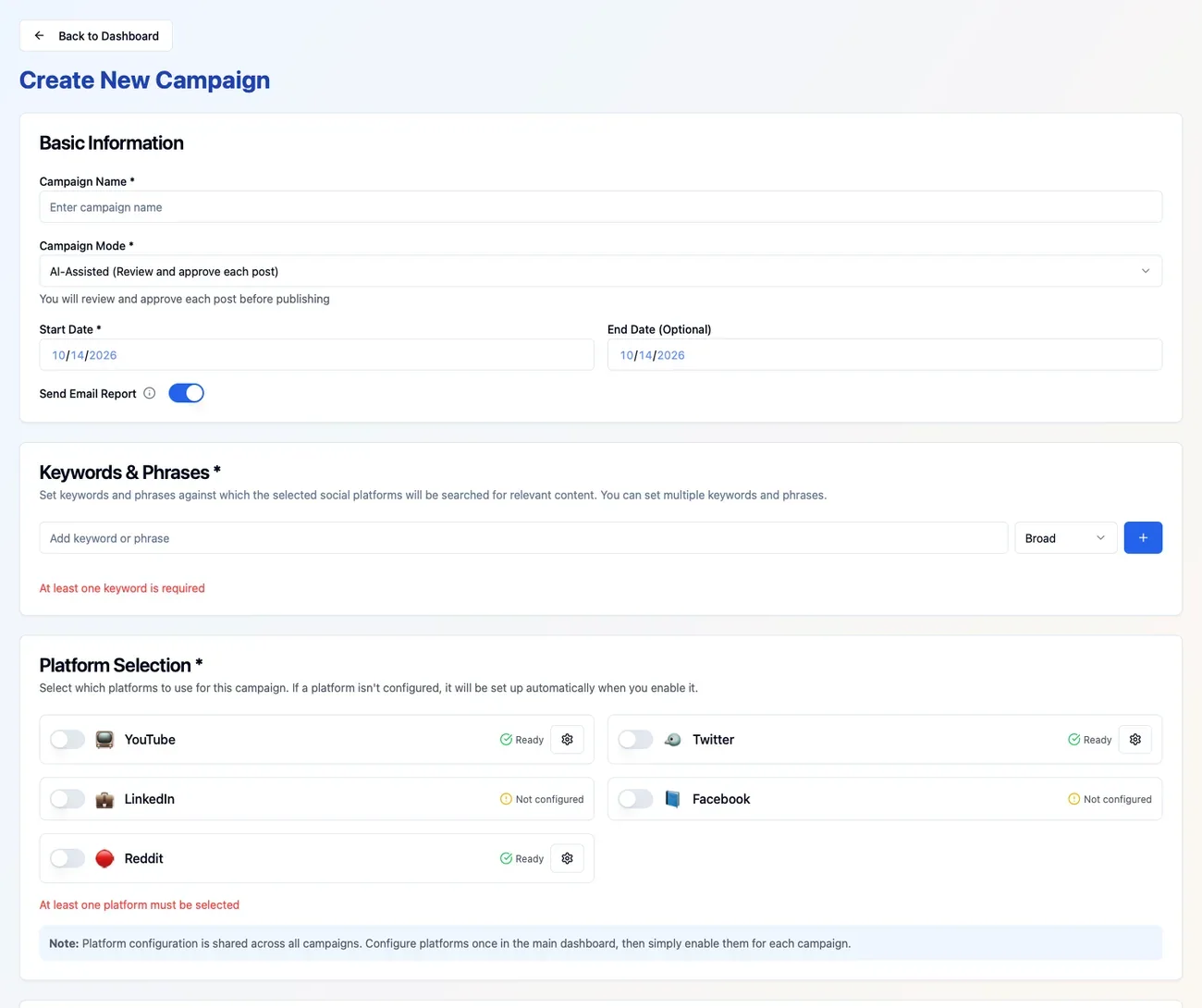
01 · CREATE
Choose your keywords and topics
Create a campaign around your product space and select X, Reddit or YouTube.
02 · DISCOVER
Find relevant conversations
See public posts and questions related to what your audience cares about.
03 · ENGAGE
Review and join the conversation
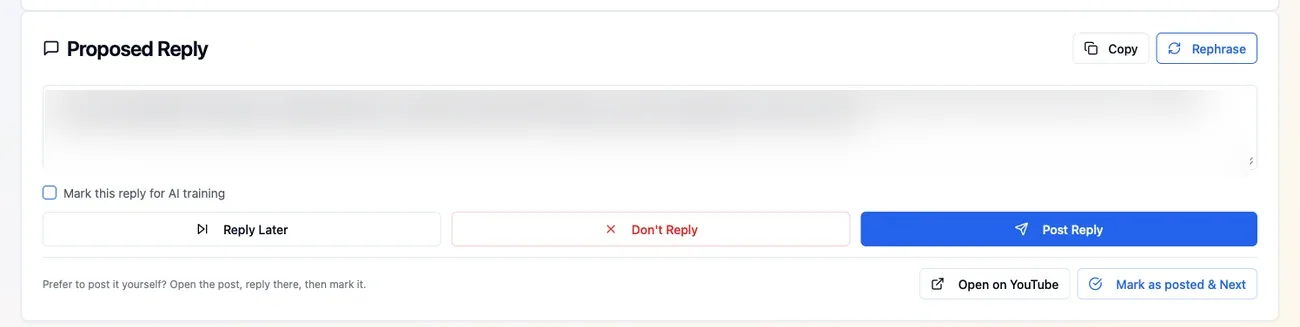
ScaleBuzz drafts replies in your brand voice. Edit, approve or skip; replies to other people are never published without your approval.
Your brand, your voice
Let AI prepare the reply. You make the final call.
ScaleBuzz prepares relevant responses based on your campaign guidance, so you are not starting from a blank page.
- Review and edit each suggested reply.
- Publish approved Reddit and YouTube replies through supported connections.
- For X conversations, post the approved reply yourself.
Beyond social listening
Don’t stop after finding the conversation.
Social listening shows you what people discuss. ScaleBuzz helps you decide how to participate — and what to create next.
Join with a helpful reply
Use AI-assisted drafts to respond to relevant questions without handing over your brand voice.
Turn topics into content
Discover emerging themes and create timely posts for your own X, Reddit or WordPress channels.
Start small, stay in control
No subscription. No social-listening contract.
Start free, set a daily campaign budget and see your usage cost before a run. Pay per use when you move beyond the free allowance.
Know the cost before you begin
Use the live calculator on Pricing to estimate conversation discovery, published posts and new trends. The app shows the actual price before you run a campaign.
Live calculator
Estimate your ScaleBuzz usage.
Adjust your activity and see an estimated cost. No subscription or commitment.
Model the work before you run it.
Free tier: 20 billable searches and 5 posts per day, no card. This calculator models pay-per-use activity and does not subtract free allowances. Taxes are excluded.
The exact price is shown in ScaleBuzz before you run a campaign. Billing happens after use — weekly or when usage reaches $100, whichever comes first.
Start free — no cardGood to know
Questions before you start?
A few practical answers. You can find more in our full FAQ.
Will ScaleBuzz post replies without my approval?
No. Replies to other people’s posts always require a person to review and approve them. On X, you publish the approved reply yourself.
Can I use ScaleBuzz just to find conversations?
Yes. You can discover conversations and follow trends without publishing a reply.
Do I need a monthly subscription?
No. You can start free and then pay for usage. Check the Pricing page for the current allowance and rates.
Start with one product or topic
Find the conversations you are qualified to answer.
Create one campaign, explore the relevant discussions and decide where a helpful response makes sense.
No card to startNo subscriptionHuman approval before replies