
How ScaleBuzz works
Find the conversations. Join them. Publish timely content.
Set your topics and keywords. ScaleBuzz finds relevant conversations on YouTube, Reddit and X, drafts replies in your voice, and turns trends into content.
No card to startNo subscriptionHuman-approved replies
Video transcript
00:00 · Introduction
ScaleBuzz. Product features and demonstration.
00:05 · Creating a campaign
To get started with ScaleBuzz, you first need to create a campaign, which is your dedicated space for finding specific content and conversations across social media.
00:13 · Campaign name and keywords
Give your campaign a name so you can easily identify it later. Then, add keywords related to the content you want to find.
00:20 · Platform selection and engagement filters
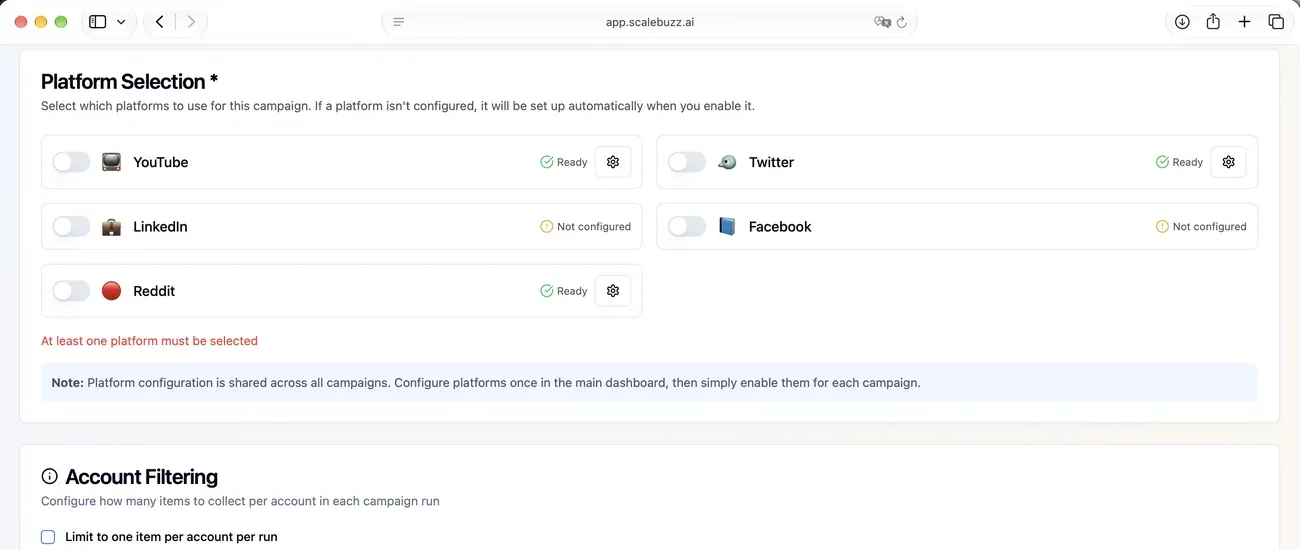
Choose the platforms you want to search and adjust the engagement filters to find content that best matches your campaign goals.
00:42 · AI prompts and customization
Next, add AI prompts to guide ScaleBuzz in generating tailored replies to each social media post. You can additionally set the tone, length, and style of your message.
01:01 · Campaign activation
Create your campaign, then return to the dashboard to activate it.
01:08 · Starting the campaign
Set the search order of your social channels and start your campaign.
01:14 · Reviewing and publishing replies
Review ScaleBuzz's suggested reply and click Post to publish it directly in the video's comment section from your business account.
01:27 · Editing replies and quick presets
Not happy with the suggested reply? Edit it manually or use Rephrase Chat to refine it in seconds. Save time on future replies by creating quick presets, like this.
01:47 · Publishing, skipping, or returning later
Publish your preferred reply when you're ready. If you're not satisfied, you can always come back later or simply skip the post.
01:58 · Publishing across different platforms
On Reddit and YouTube, you can approve and publish replies directly through ScaleBuzz. On X, ScaleBuzz prepares the reply for you to post manually.
02:14 · Campaign activity and results
Whichever platform you choose, ScaleBuzz gives you an overview of your campaign activity and results. You also have full control over what gets posted, as ScaleBuzz only publishes replies when you approve them.
02:27 · Trending topics
ScaleBuzz also helps you spot trending topics in your niche and find active discussions where your business can contribute.
02:32 · Content generation
Choose a topic and let ScaleBuzz generate content you can share across your social media channels.
02:40 · Business benefits
Join conversations where your business can help and make it easier for potential customers to discover you.
02:44 · Call to action
No subscriptions or commitments. See the price upfront and get started for free at scalebuzz.ai.
02:52 · Closing screen
ScaleBuzz — scalebuzz.ai
Three things you can do
From conversations to content. In one platform.
Stop switching between social networks, manual searches and separate content tools. ScaleBuzz brings the work together.
Discover conversations
Find people asking questions and discussing topics that matter to your business.
Join the discussion
Review AI-written replies in your brand’s voice and participate where your knowledge is useful.
Publish timely content
Spot emerging trends, turn them into posts and publish to your own social channels or blog.
Workflow 01 · Discover & engage
From your keywords to a conversation worth joining.
A simple journey: tell ScaleBuzz what matters, explore relevant conversations, and join the ones where you can help.
X · Reddit · YouTube
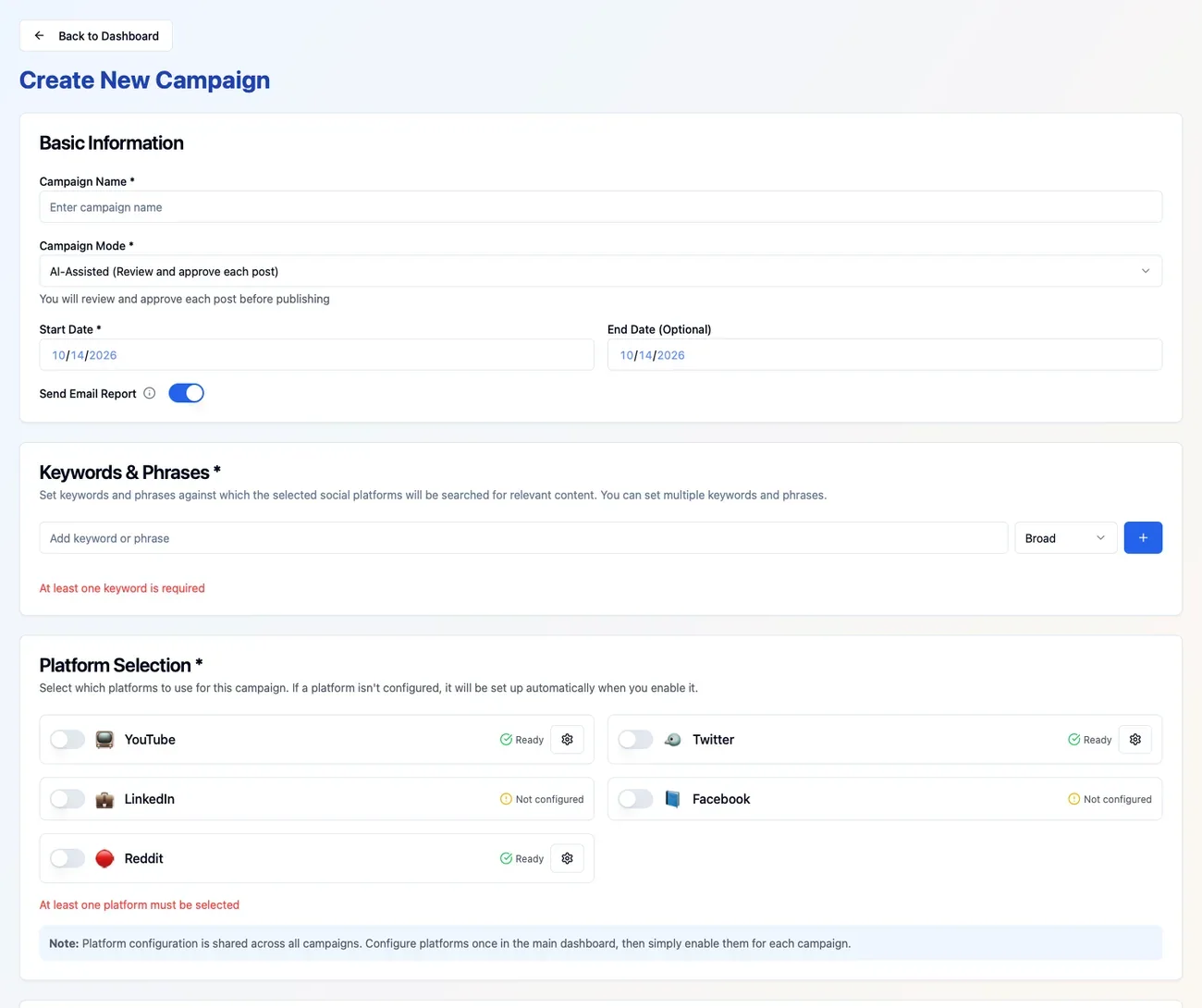
1Create a campaign
Tell ScaleBuzz what to look for.
Add the keywords and topics related to your business, product or audience. Choose where to look — X, Reddit and YouTube — and create your campaign.
You can also choose languages and a daily budget. ScaleBuzz shows the costs before you run a search.
2Discover conversations
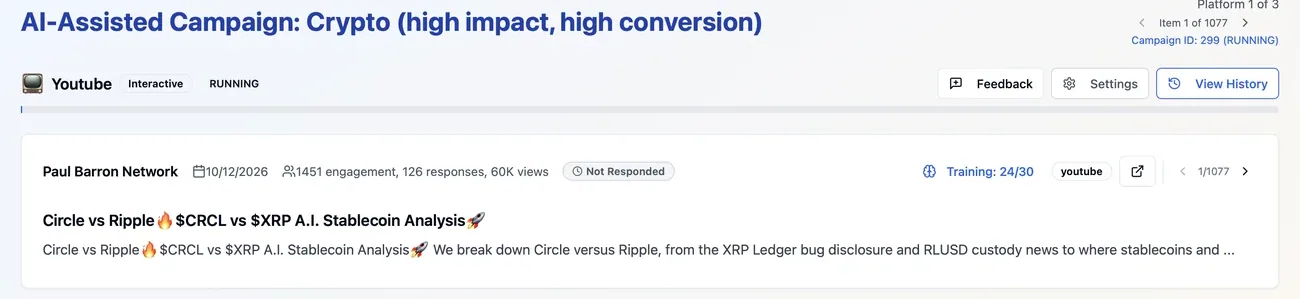
See what your potential customers are discussing.
Run your campaign to find posts, comments and videos related to your keywords and topics. ScaleBuzz brings the results together so you can explore the original conversations without searching each platform yourself.
Open the conversations that matter to your business and decide where you have something useful to add.
3Join the conversation
Reply in your own brand voice.
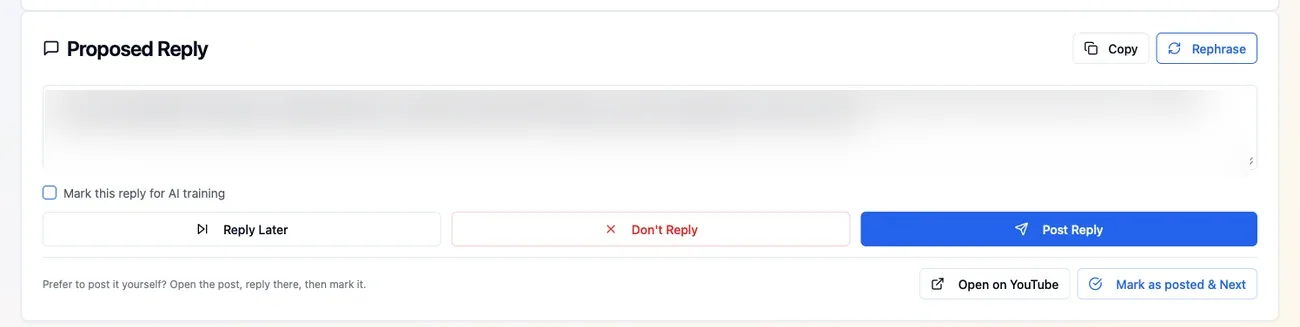
ScaleBuzz prepares a relevant reply using your brand guidance. Review it, make changes if you like, and choose whether to post.
Approved replies can be posted through ScaleBuzz on Reddit and YouTube. On X, you post the prepared reply yourself.
ScaleBuzz never automatically comments on someone else’s post without your approval.
Workflow 02 · Trends & publishing
Spot trending topics. Turn them into content.
Beyond individual conversations, ScaleBuzz helps you see what is gaining attention in your market and create content for your own channels.
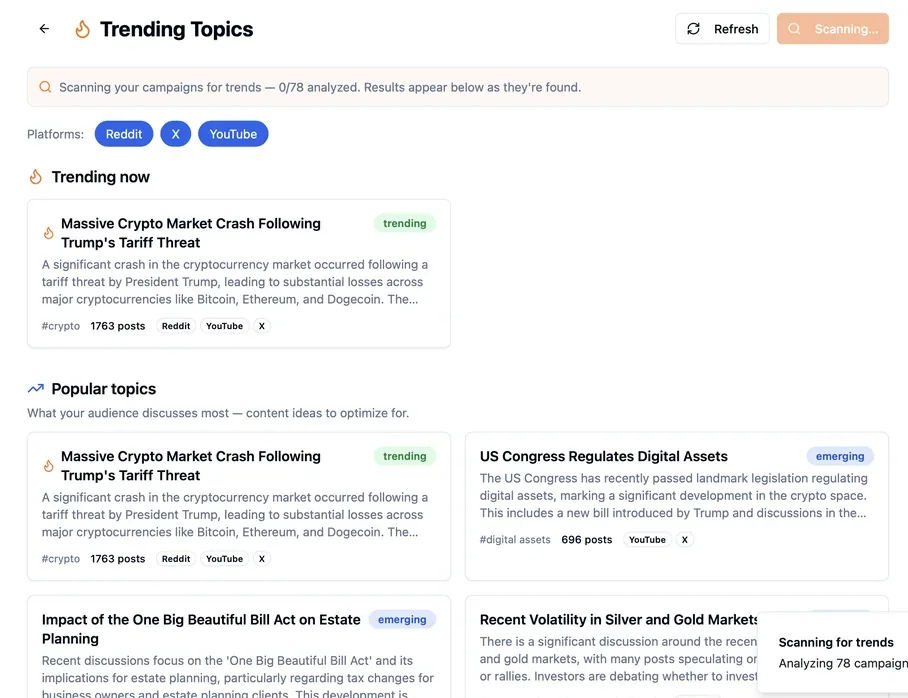
01 / TREND DETECTION
See what is trending in your market.
ScaleBuzz surfaces emerging and trending topics connected to your campaigns, with supporting conversations from X, Reddit and YouTube. You can explore the discussions behind each topic.
02 / CONTENT PUBLISHING
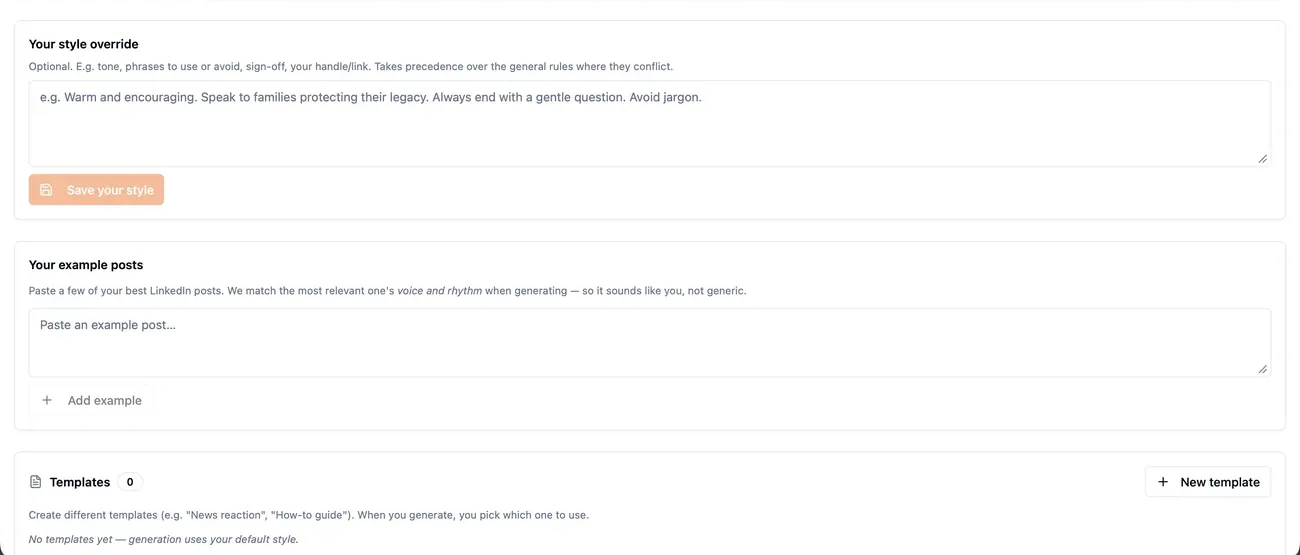
Create posts in your brand voice.
Use trending topics as a starting point for content on your own X, Reddit and WordPress channels. Set your brand voice and create content that fits each channel. Publishing to your own channels can run automatically.
Make it part of your workflow
Stay active without starting from scratch every day.
Once you’ve set up a campaign, ScaleBuzz helps you keep finding opportunities and see what the work produced.
Schedule your searches
Turn on scheduled searches so ScaleBuzz can find new conversations and trending topics on days you haven’t run the campaign yourself.
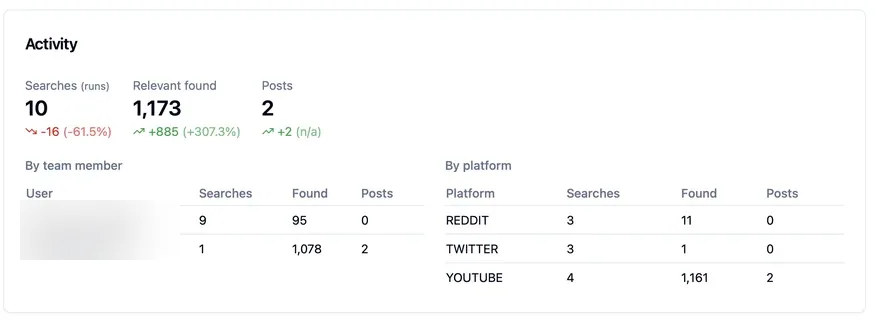
See what your campaigns did
See searches run, relevant conversations found and replies posted. Reporting can also show tracked account and website activity where configured.
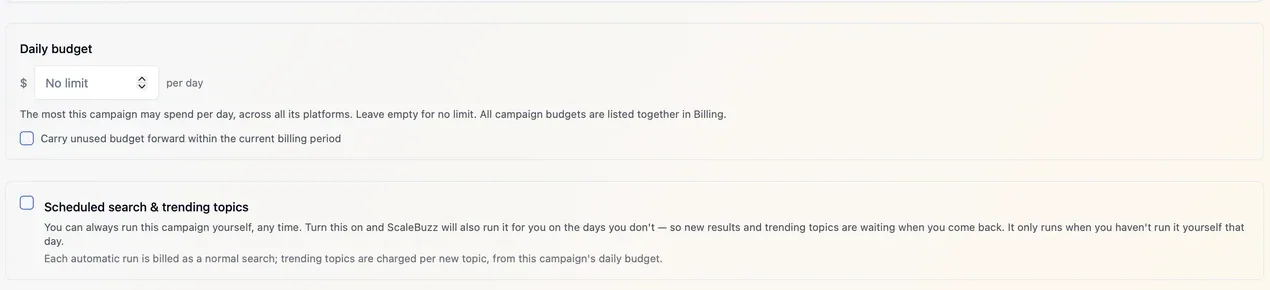
Stay in control of costs
See usage-based costs before running searches, set campaign budgets and get started without a subscription.
Simple, transparent pricing
Start free. Pay only for what you use.
See pricing before you run a search and set a daily budget for each campaign. Start free with no credit card, subscription or long-term commitment.
Free to startNo subscriptionKnow costs before you run
Common questions
A few things worth knowing.
Do I need to set up separate campaigns for different topics?
You can create a campaign for each product, topic or client you want to follow. Each campaign uses the keywords and topics you choose, along with the platforms you want ScaleBuzz to search.
Does ScaleBuzz automatically reply to people's posts?
No. ScaleBuzz prepares draft replies, but a person reviews and approves each one. Approved replies on Reddit and YouTube can be published through ScaleBuzz. On X, you post the approved draft yourself.
Where can ScaleBuzz find conversations?
ScaleBuzz discovers conversations on X, Reddit and YouTube. For content publishing to your own channels, it supports X, Reddit and WordPress.
Can ScaleBuzz keep finding conversations for me?
Yes. Enable scheduled search and trending topics in your campaign. ScaleBuzz can run it automatically on days you haven’t already run it yourself.
Can it publish content from trending topics?
Yes. ScaleBuzz can generate content inspired by trending topics and publish it to your own supported social channels or WordPress blog. This is separate from replying to someone else’s content, which always requires human approval.
Can I see the price before running a campaign?
Yes. ScaleBuzz displays the price before you run, and its pay-per-use pricing means you don’t need a subscription. You can start free without a card.
Is publishing my own content the same as replying to other people?
No. Replies to other people’s posts are reviewed by you before publishing. Publishing to your own connected channels can be automated using your content style and campaign settings.
Ready to try it?
Start with the topics your customers already care about.
Find the conversations. Join where you can help. Turn what you learn into content worth sharing.
No card to startNo subscriptionOfficial platform APIs